 Meylan Technologies & Consulting
A new transaction in PFCG mass maintenance
New transaction in SAP S/4HANA 2025: PFCGMASSMAINTRELTRAN, "Add/ Delete Related Transactions to Roles". It starts report PFCG_MASS_MENU_MAINT_REL_TRANS. I found no SAP note, KBA or help page about it yet.
The transaction maintains role menus in bulk, based on a list of transaction dependencies delivered by SAP. This article describes how it works, what is delivered today, and what to watch before you run it. It is based on the report source code and the related tables in a 2025 FPS02 system.
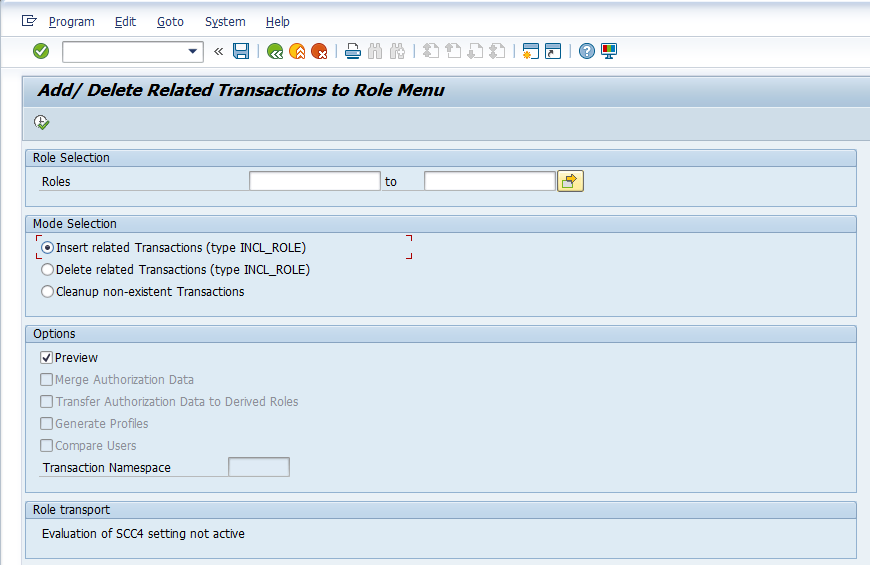 Selection screen: roles, three modes, and the follow-up options.
The problem it addresses
Some transactions do not work alone. They call another transaction, or a service such as a Web Dynpro application, an OData service or an SQL service. The user then needs S_TCODE for the second transaction and S_SERVICE for the service, in addition to the transaction in the menu.
Today, role administrators usually find these gaps after go-live, through SU53 or an authorization trace, and fix each role by hand. With this mechanism, SAP can declare the dependency once: "a role that contains transaction X also needs transaction Y and its services". A mass report then applies that rule to every role concerned.
The CDS view behind it has the label "Transaction Dependency for Roles". That label matches this reading.
The mechanism: two tables
The dependencies are stored in two tables, each read through a CDS view.
| Table | CDS view | Content |
|---|---|---|
TSTCR | P_TSTCR_ROLE | Transaction relations: TCODE, REL_TYPE, REL_TCODE. The view keeps relation types INCL_ROLE and REQU_ROLE. |
TSTC_USOBHASH | P_TSTC_USOBHASH | Services linked to a transaction: hash name, type, PGMID, object, object name, service type, service. |
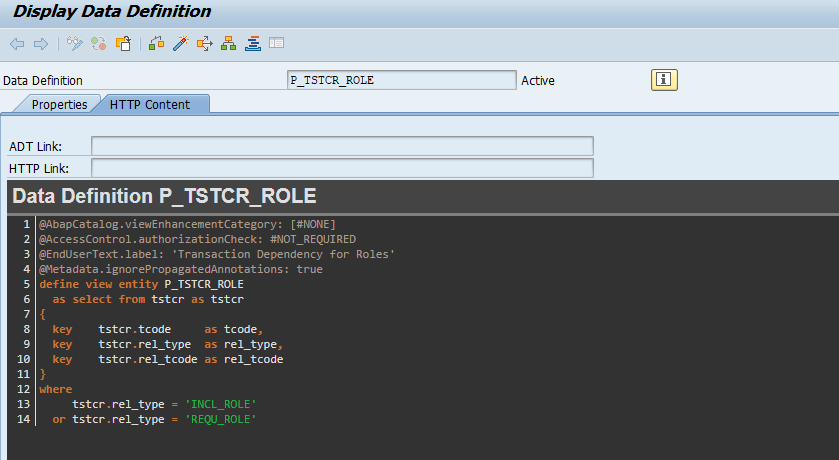
P_TSTCR_ROLE reads TSTCR and keeps relation types INCL_ROLE and REQU_ROLE.
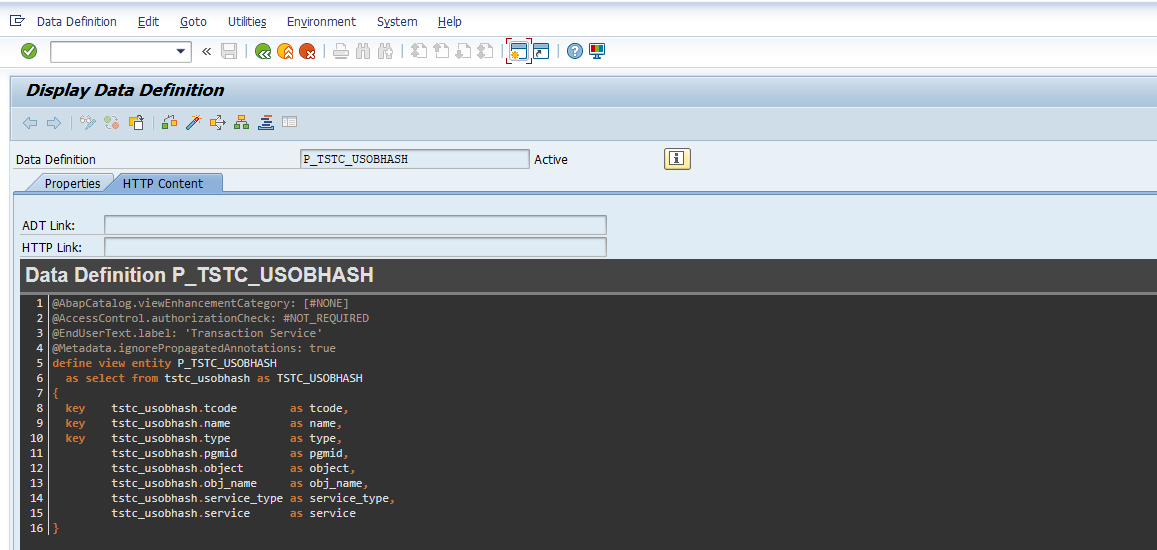
P_TSTC_USOBHASH reads the services linked to each transaction.
The reading direction matters. In TSTCR, REL_TCODE is the transaction already in the role menu. TCODE is the transaction to add. A row with REL_TYPE = INCL_ROLE means: "if a role contains REL_TCODE, include TCODE in the role".
The report only uses INCL_ROLE. REQU_ROLE is defined in the view but not used by this report. Its name suggests a "required" check rather than an automatic insert, but no entry exists yet to confirm it.
For each transaction to add, the report collects its services from TSTC_USOBHASH and from the SU22 data of the transaction (class CL_TRAN_SU22). The report adds these services to the role menu too. The role then gets the matching S_SERVICE values from SU24.
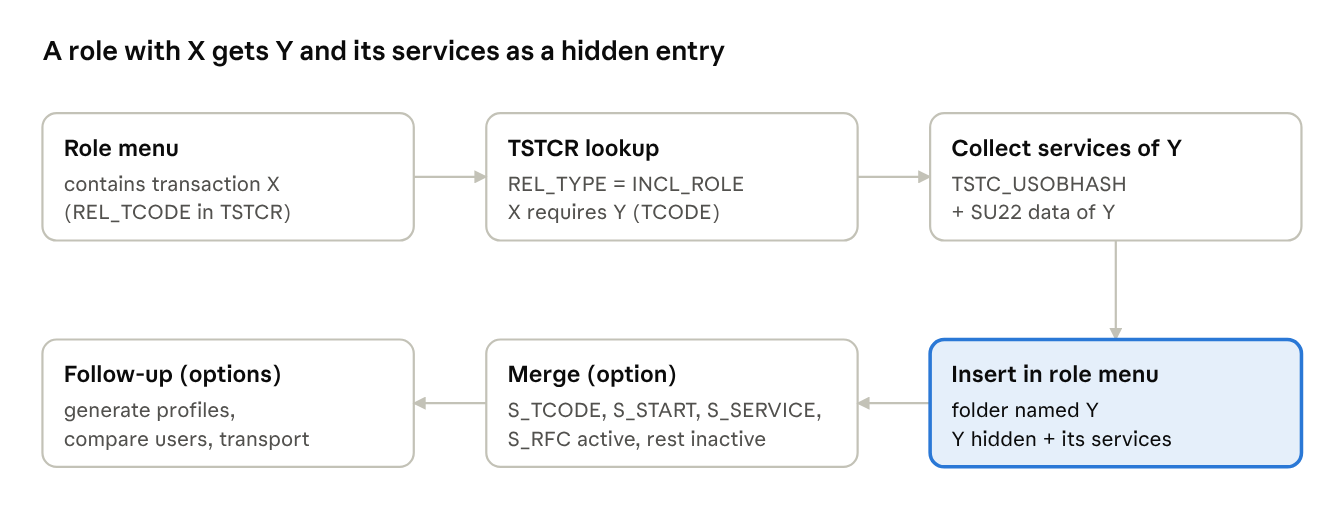 The report reads the role menu, looks up the dependency in
TSTCR, collects the services, and adds them to the menu as a hidden entry. The merge and the follow-up steps are optional.
What the report does
You select single roles and one of three modes. The report skips derived roles with the message "Role contains no own menu", because their menu comes from the parent role. It locks each role during processing.
| Mode | What it does | Uses TSTCR |
|---|---|---|
Insert related transactions (INCL_ROLE) | For each related transaction, creates a menu folder named after it. Adds the transaction as a hidden node and adds its services. Skips it if the transaction and all its services are already in the menu. | Yes |
Delete related transactions (INCL_ROLE) | Removes those folders. A folder is only removed when it holds nothing but the related transaction and its services. | Yes |
| Cleanup non-existent transactions | Finds menu transactions that no longer exist in TSTC and removes their folder when it holds nothing else. A transaction namespace is mandatory, for example Z or /ABC/. | No |
The inserted transaction is hidden (visibility "invisible"). Users do not see it in their menu or launchpad. It is only there to bring the SU24 proposals and S_SERVICE values into the role.
The options control the follow-up steps:
- Preview (on by default): nothing is saved. The ALV list shows what would change.
- Merge Authorization Data: runs the PFCG expert mode merge. It adds only
S_TCODE,S_START,S_SERVICEandS_RFCas active. It adds all other new proposals as inactive, for review in PFCG. - Transfer Authorization Data to Derived Roles, Generate Profiles, Compare Users: the usual follow-up steps, run automatically.
- Role transport: with SCC4 set to automatic recording, the report writes the changed roles to a transport request.
The merge behaviour is a good design choice. The report does not silently activate new business authorizations. It only gives the start authorizations needed to call the transaction and its services.
What is delivered today
In S/4HANA 2025 FPS02, each table holds one row, and it is an SAP test case:
| Table | Entry |
|---|---|
TSTCR | SE93_TEST_PAR_SQL1, INCL_ROLE, SE93_TEST_DIA |
TSTC_USOBHASH | SE93_TEST_PAR_SQL1, type HT, R3TR SQL1 DBC2ABAPTEST |
SE93_TEST_DIA is "SE93 Test - Dialog Transaction". SE93_TEST_PAR_SQL1 is "SE93 Test - Parameter Transaction (S_SQL1_BASE)". The rule reads: a role with SE93_TEST_DIA must also include SE93_TEST_PAR_SQL1 and its SQL service DBC2ABAPTEST.
The framework is in place, but SAP does not deliver real content yet. On customer roles, Insert and Delete will find nothing to do, unless a role contains SE93_TEST_DIA. The Cleanup mode does not depend on TSTCR and is useful now: it removes deleted custom transactions from role menus.
Points of attention
The merge flag is not reset between roles. Before the merge, the report checks the profile status of each role (function PRGN_CHECK_PROFILE_STATUS) and allows the merge only when it returns "D". The variable that holds this result is never cleared in the loop. Once one role qualifies, the report also merges later roles in the same run if their menu changed. Until SAP corrects this, run the report on small sets of roles.
Other recommendations:
- Always run with Preview first and read the ALV list before a productive run.
- After a merge, review the inactive authorizations in PFCG. They are SU24 proposals of the new transaction and stay inactive until you decide.
- Check
TSTCRafter each feature pack or support package. The day SAP delivers real dependencies, the Insert mode becomes relevant for your roles. - Use the Cleanup mode with a precise namespace. It is a simple way to remove obsolete custom transactions from role menus before a role upload or a release change.
Can you add your own relations?
Not in a supported way today. TSTCR has delivery class W (system table, contents transported by separate objects) and data browser maintenance "allowed with restrictions", so there is no SE16 or SM30 maintenance. TSTCR is not linked to any transport object in table OBJSL, and the where-used list of TSTCR finds no code that writes to it. An entry that you add directly in the database would stay out of transports, and SAP would not see it.
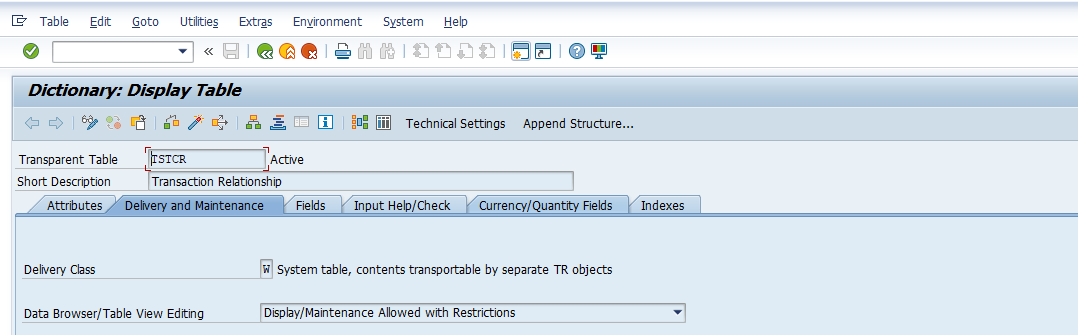
TSTCR: delivery class W, maintenance allowed with restrictions.
For your own transactions, the supported route stays the same. In SU24, maintain the called transaction as an S_TCODE proposal on the custom transaction. If the custom transaction uses CALL TRANSACTION, also set the check indicator in SE97. PFCG then adds the called transaction to the role when you merge.