 Meylan Technologies & Consulting
A new PFCG mass transaction in S/4HANA 2025
SAP S/4HANA 2025 introduces a new role maintenance transaction: PFCGMASSUPDDFLTS, "Update of Applications and Default Values in Single Roles". It starts report PFCG_MASS_UPD_DFLTS, described in its header as "Mass update of applications and default variants in roles".
The transaction brings the Applications tab of many single roles up to date in one run. This article explains what that tab is, how the report works, and what to check before you use it. It is based on the report source code and a preview run in a 2025 FPS02 system.
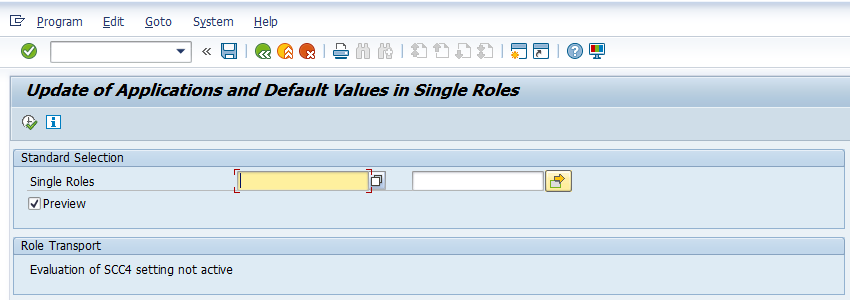 Selection screen: a range of single roles, the Preview flag and the role transport block.
Background: SU24 variants and the Applications tab
In recent releases, SU24 lets you create variants of the authorization default values of an application. A variant holds your own proposals next to the SAP standard proposals, without changing them. PFCG has an Applications tab that lists the applications of the role menu and the SU24 variants available for each one. You choose which variant the role uses. The merge then reads the default values of that variant (SAP blog on SU24 variants).
PFCG stores the Applications tab per role, in table AGR_APPL_VARS. PFCG fills the tab when it reads the role menu. The tab can become out of date:
- An application enters the menu, for example through a catalog update, and is not yet on the tab.
- Someone deletes or renames in SU24 a variant that the role references.
- An upgrade changes the applications or the delivered variants.
Without a mass tool, you refresh the tab role by role in PFCG. PFCGMASSUPDDFLTS does it for a range of roles.
What the report does
The selection screen is short: a range of single roles, a Preview flag (on by default), and the role transport block driven by the SCC4 setting.
The report only processes roles that meet four conditions:
| Condition | Reason |
|---|---|
| Single role (not composite) | Composite roles have no applications of their own. |
| Not derived (no parent role) | Derived roles inherit their menu. |
Has a role menu (entries in AGR_HIER) | No menu, no applications. |
No CUSTOMIZE flag in AGR_FLAGS | These roles are excluded by design. |
Class CL_PFCG_APPL_VARS_MASS_UPD does the comparison, in method UPDATE_DFLTS_MASS_MAINT. The report calls it twice: first in simulation mode for the preview, then in change mode when you execute.
The run has two steps:
- Preview. The class simulates the update. The report locks every role that would change, so nobody edits it in between. The report removes roles that someone else has locked from the list and shows a message. The ALV list shows, per role, each application or default variant, its type, a comparison icon and the reason for the change. From the list you can exclude roles, open a role in PFCG in display or change mode, or show the old role data.
- Execute. The report releases the locks, and the class runs again in change mode. The report saves the roles, and the list shows the result with a message log. From there you can pass the changed roles to the mass download (
PFCG_MASS_DOWNLOAD) or the mass transport (PFCG_MASS_TRANSPORT).
With SCC4 set to automatic recording, the report writes the changed roles to a transport request. Authorization profiles and personalization data are options. In background (preview flag set), the report only simulates and writes "Changes simulated; no database change".
Start authorization: the report accepts S_TCODE for PFCGMASSUPDDFLTS or, if missing, for PFCG. The SU24 proposals of the transaction are S_USER_AGR with activities 02, 03, 21 (transport) and DL (download).
Example: a preview run
A preview on two template roles (renamed here) shows the two kinds of changes the report makes:
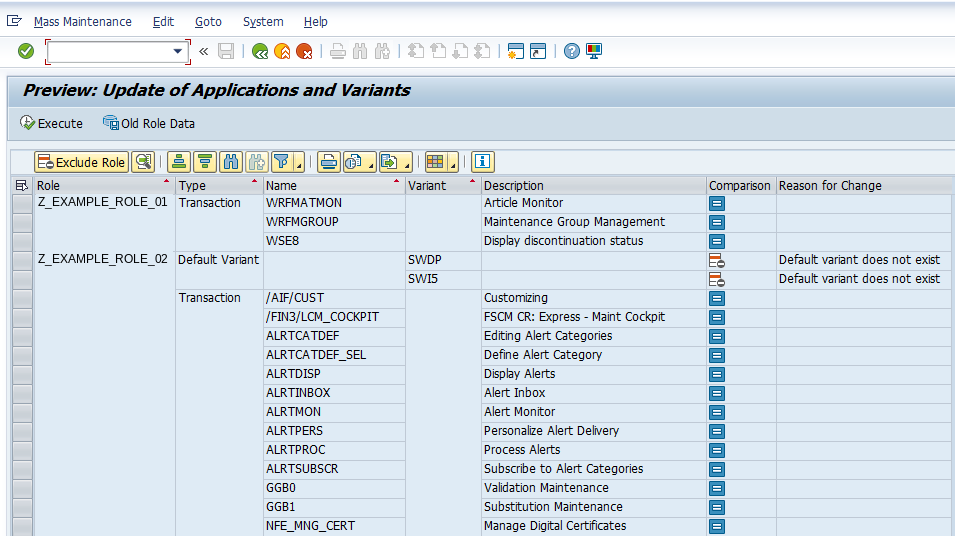 Preview: application entries to update, and two default variants to remove because they no longer exist. Role names changed.
| Role | Type | Entries | Reason for change |
|---|---|---|---|
| Z_EXAMPLE_ROLE_01 | Transaction | WRFMATMON, WRFMGROUP, WSE8 | none shown |
| Z_EXAMPLE_ROLE_02 | Default Variant | SWDP, SWI5 | Default variant does not exist |
| Z_EXAMPLE_ROLE_02 | Transaction | /AIF/CUST, ALRTCATDEF, GGB0, OB40 and others (23 rows on screen) | none shown |
The transaction rows are applications of the role menu. The report updates their entry on the Applications tab. The default variant rows point to variants that no longer exist in SU24. They carry a delete icon, and the report removes them from the role.
The report source does not define the comparison icons or the full list of reasons. Both come from class CL_PFCG_APPL_VARS_MASS_UPD. The preview toolbar also has an Old Role Data button, next to Execute.
Points of attention
Anyone with PFCG can run it. The report accepts the PFCG start authorization when S_TCODE for PFCGMASSUPDDFLTS is missing. Changes are still limited by S_USER_AGR, but a role administrator does not need a new authorization to use it. Review who has change access (S_USER_AGR activity 02) on which role ranges.
Preview locks the roles. During the preview, the report locks every role that would change until you leave the list or execute. Run large previews outside the hours when other administrators work in PFCG.
No merge, profile or user comparison options. The selection screen has no options to merge authorization data, generate profiles or compare users. After execution, open a few changed roles in PFCG and check the authorization status before you transport them.
It does not apply SU24 value changes. I tested it: I removed a field value from the SU24 proposals of a transaction already in a role, then ran PFCGMASSUPDDFLTS on that role. The role's authorization values did not change. The transaction maintains the list of applications and variants, not the authorization data.
To align roles with changed SU24 values, the route is still SU25 step 2c to find the affected roles, then the merge in PFCG. Authorizations with status Manual or Changed stay in the role after a merge. You must remove them by hand.
Removed variants change future merges. When a variant reference is removed, the next merge reads other default values for that application. Check why the variant disappeared in SU24 before you execute. SAP KBA 3720999 also describes unexpected deletions of authorization defaults linked to the Applications tab.
Recommendations:
- Always run the preview first and exclude the roles you do not want to change.
- Run it after each upgrade or SU24 variant clean-up, on small ranges of roles.
- Use the mass download from the result screen to keep a copy of the changed roles.
- Transport the changed roles together with the SU24 changes that caused them.